
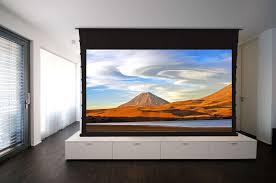
When setting up a home theater, a corporate boardroom, or an educational lecture hall, most of the budget and attention typically goes toward the projector itself. People obsess over lumens, 4K resolution, and laser light sources. However, there is a fundamental truth in the world of AV: A projector is only as good as the surface it reflects upon.
Choosing the right projector screen is the difference between a washed-out, mediocre image and a crisp, cinematic experience that pops with color and contrast. This comprehensive guide will explore the science of screen materials, the various form factors available, and how to choose the perfect surface for your environment.
1. Why Not Just Use a White Wall?
It is the most common question in the industry: “Can’t I just use my wall?” While a smooth white wall will catch an image, it is far from an optimized viewing surface.
- Texture: Even “smooth” drywall has microscopic pits and bumps that create shadows and “noise,” reducing the sharpness of a 4K image.
- Reflectivity (Gain): Standard wall paint is designed to scatter light to make a room feel bright, whereas screen material is engineered to reflect light back toward the audience.
- Color Accuracy: Most “white” walls have slight yellow or blue undertones that distort the color profile of your projector.
- Frame and Contrast: A dedicated screen has a black border (masking) that improves perceived contrast by giving the eye a clear reference point for “black.”
2. Understanding Screen Gain and Color
The “performance” of a screen is usually defined by its Gain and its Color.
What is Screen Gain?
Gain is a measurement of the light reflectivity of a screen compared to a standard white board (which has a gain of 1.0).
- Low Gain (0.5 to 0.9): These screens are often grey. They absorb more ambient light and are excellent for improving black levels in rooms that aren’t perfectly dark.
- Unity Gain (1.0): This reflects light equally in all directions. It offers the widest viewing angle, meaning everyone in the room sees the same image quality regardless of where they sit.
- High Gain (1.1 to 2.5+): These screens focus the light into a narrower “cone” directed at the viewers. This makes the image much brighter but can lead to “hot-spotting” (where the center of the screen is brighter than the edges).
White vs. Grey vs. Silver
- White Screens: The industry standard for dark, controlled rooms. They offer the most accurate colors.
- Grey Screens (High Contrast): Designed for rooms with some ambient light. They help maintain deep blacks even when there is a lamp on in the background.
- Silver/3D Screens: Specialized surfaces used for passive 3D projection or extremely high-brightness requirements.
3. Form Factors: Fixed, Manual, and Electric
How the screen is mounted and deployed depends on the versatility of your space.
Fixed-Frame Screens
These are permanently mounted to the wall like a giant picture frame. The screen material is stretched tight over a metal frame, ensuring a perfectly flat surface that will never wrinkle.
- Best For: Dedicated home theaters and permanent boardrooms.
Manual Pull-Down Screens
These are the classic “classroom” screens. They function like a window shade.
- Best For: Budget-friendly setups or multi-purpose rooms where the screen needs to disappear when not in use.
Electric (Motorized) Screens
With the push of a button or a signal from the projector, the screen lowers from a housing on the wall or recessed in the ceiling.
- Best For: High-end “stealth” installs and executive offices.
Tab-Tensioned Screens
A common issue with roll-up screens is “curling” at the edges over time. Tab-tensioned screens use a system of strings and tabs to pull the screen tight as it unrolls, providing the flatness of a fixed screen with the convenience of a motorized one.
4. Specialized Screen Materials
Ambient Light Rejecting (ALR)
ALR screens are the “holy grail” for living rooms. They use a microscopic optical saw-tooth structure that reflects light coming from the projector toward the viewer while absorbing or diverting light coming from the ceiling or windows. This allows you to use a projector in broad daylight with impressive results.
Acoustically Transparent (AT)
In professional cinemas, the speakers are actually located behind the screen. AT screens use a micro-perforated or woven fabric that allows sound to pass through with minimal muffled effect. This ensures that the dialogue sounds like it is coming directly from the characters’ mouths.
5. Integrating Screens into a Professional Ecosystem
Selecting a projector screen is a major step toward visual excellence, but it shouldn’t be done in a vacuum. A screen is part of a larger technical chain that includes the projector, the media source, and the networking infrastructure that ties it all together.
For organizations and professionals who demand reliability in their AV and IT setups, Tecisoft offers a curated selection of hardware and IT solutions designed for the modern workspace. Whether you are installing a motorized screen in a high-density office or setting up a complex networking array to feed your media players, having a source for professional-grade peripherals is essential. High-quality hardware ensures that your signal remains stable and your equipment—including your screen’s motorized components—operates without a hitch for years to come.
6. Sizing and Aspect Ratios
Choosing the wrong size is the most common regret among screen buyers.
Aspect Ratios
- 16:9 (HDTV): The standard for home theaters, gaming, and most modern presentations.
- 2.35:1 (Cinemascope): For the ultimate “widescreen” movie experience.
- 16:10: Common in corporate environments to match the native resolution of many business laptops.
The “Goldilocks” Size
To find the right size, measure the distance from the screen to your primary seat.
- Minimum Distance: 1.5 times the screen’s width.
- Maximum Distance: 3 times the screen’s width. If you go too big, you’ll find yourself “scanning” the screen like you’re at the front row of a movie theater, which causes neck strain.
7. Installation and Maintenance
Finding the Right Height
The bottom of the screen should typically be between 24 and 36 inches off the floor. If it’s too high, you’ll be looking up, which is uncomfortable for long periods. If it’s too low, furniture or people’s heads might block the view.
Keeping it Clean
Projector screens are sensitive. Dust them with a dry, lint-free cloth or use pressurized air. Never use harsh chemicals or window cleaners, as these can strip the optical coatings (especially on ALR screens). If a mark appears, use a very mild soap-and-water solution and dab—never scrub.
8. The Impact of the Border (Masking)
The black velvet border around a screen isn’t just for decoration. It serves two technical purposes:
- Perceived Contrast: The black border provides a dark reference point. Because our eyes perceive color and brightness relative to what is nearby, the black border makes the “blacks” in the image look deeper.
- Overscan Absorption: It’s often difficult to get a projector image to perfectly align with the edges of a screen. The black velvet “soaks up” the extra light, allowing you to have a perfectly rectangular image without seeing the “light bleed” on your wall.
9. Future Trends: The Move to Ultra-Short Throw (UST)
UST projectors sit just inches from the wall. Because of the extreme angle of the light, they require a specialized screen called a CLR (Ceiling Light Rejecting) screen. These screens have a microscopic horizontal “fin” structure that only accepts light from below (the projector) and blocks light from above (the ceiling). This combination is currently the biggest competitor to giant-screen LEDs.
10. Conclusion
A projector screen is not just a white sheet; it is an engineered optical component. Whether you are looking for an ALR surface to turn your bright living room into a cinema or a large-scale motorized screen for a corporate auditorium, the surface you choose defines the quality of the final image.
By understanding the relationship between gain, viewing angles, and ambient light—and by sourcing your supporting hardware from trusted experts—you can ensure that your visual communication is as impactful as possible. Don’t let your high-end projector be held back by a low-end surface. Give your data and your movies the canvas they deserve.